Skip to content
SproutAceve · v3.19.1
Get started
Overview What is your role? Connect to Sprout Adopting Sprout
Foundations
Brand & logos Color Typography Spacing & layout Elevation Iconography Accessibility
Components
Overview Buttons Inputs & forms Numeric input Data grid Ribbon toolbar Navigation Cards Dialog Tabs Menu
Practice
Interaction & motion Voice & content Product patterns
Artificial Intelligence
AI patterns AI transparency & disclosure AI disclosure label
People & ethics
Design principles Personas Trust and ethics Meet the makers
Playground
Build the systemplay Tower of tokensplay
Behind the system
How it works Changelogv3.19 Roadmap Contribute
Artificial Intelligence

AI Transparency & Disclosure.

Patterns for identifying AI interactions, generated content, recommendations, and code suggestions

Purpose

When AI meaningfully shapes an experience, make its role clear at the point of interaction. Identify what AI did, place the disclosure close to the affected output, and provide additional context or controls when the result could influence a decision.

This guidance supports transparent and responsible product design. Legal requirements vary by use case and jurisdiction and should be confirmed with your legal or compliance team.

Core Principles

01Disclose AI involvement at the point of first interaction or exposure.
02Place labels close to the AI-generated or AI-influenced output.
03Describe what AI did—not simply that AI was involved.
04AI-generated for fully generated content.
05AI-assisted only when a human remains meaningfully involved and takes responsibility.
06Do not rely on color, icons, emojis, or tooltips alone.
07Provide an explanation when an AI output could influence an important decision.
08Use clear, concise language without overstating the system's accuracy or capabilities.

1. Conversational AI

Classification:Compliance-sensitive
Guideline

Tell people they are interacting with AI at or before the first exchange, unless this is already obvious from the context. Keep the disclosure clear, accessible, and available throughout the conversation.

Ux copy examples
At the start of the conversation: You're chatting with an AI assistant, not a human. Responses are generated automatically and may be inaccurate.
On assistant messages: AI
Supporting text or tooltip: Generated by [Product name] AI. Check important information.
Image example
Chatbot interface with AI disclosure banner at the top and a message-level AI badge with tooltip reading 'Generated with [Model Name] Verify critical facts.'
Usage guidance
  • Show the initial disclosure before or with the first AI message.
  • Do not place the disclosure exclusively in a tooltip.
  • Give the AI badge an accessible name, such as "AI-generated response."
  • If supporting information appears in a tooltip, make it available on keyboard focus and touch devices.
  • Prefer the customer-facing product name over an internal model identifier.

2. AI-Generated Text and Summaries

Classification:Compliance-sensitive for public-interest content
Guideline

Clearly label text that is generated and published without human review. For content intended to inform the public about matters of public interest, disclose that it was AI-generated unless it has undergone human review or editorial control and a person or organization accepts editorial responsibility.

Ux copy examples
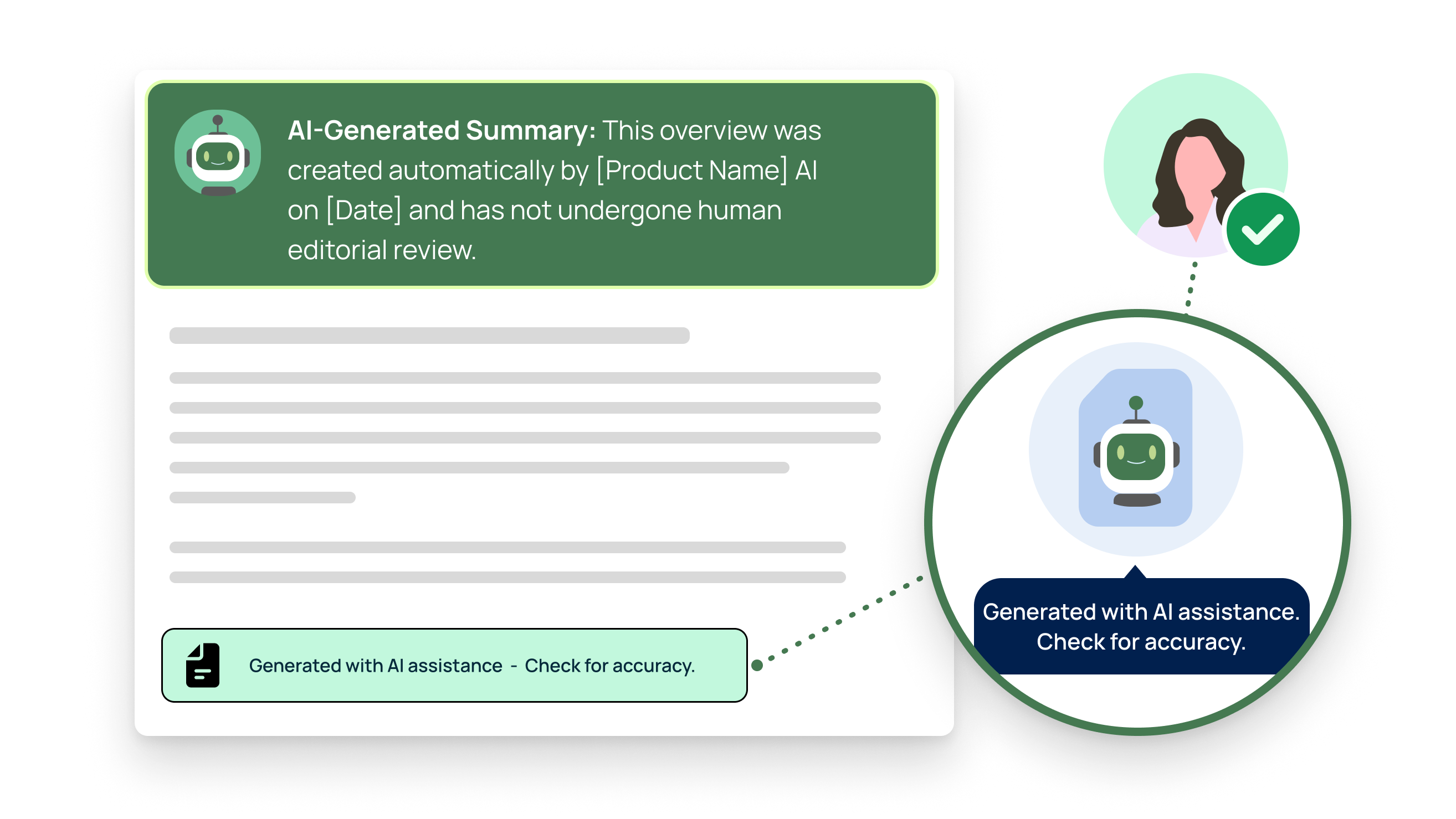
Above fully automated content: AI-generated summary: Created automatically by [Product name] AI on [Date]. Not reviewed by an editor.
Compact footer: AI-generated - Not reviewed by an editor - Check for accuracy
For human-reviewed content: Created with AI assistance - Reviewed by [Team or editor]
Image example
Document with an AI-Generated Summary disclosure header and a compact footer label 'Generated with AI assistance — Check for accuracy.'
Usage guidance
  • Use AI-generated when AI produced the content without editorial review.
  • Use Created with AI assistance only when a human has meaningfully reviewed the content and accepts responsibility for it.
  • Do not use a subtle footer as the only disclosure for fully automated public-interest content.
  • Include the generation date only when it is useful and can be kept accurate.
  • Consider giving users access to the original source material.

3. AI Recommendations and Predictive Scores

Classification:Recommended practice; requirements depend on context
Guideline

Tell users when a recommendation, ranking, or score is generated or personalized by an automated model. Explain the main factors that influenced the result — especially when it could affect an important decision — and provide a way to inspect the details.

Ux copy examples
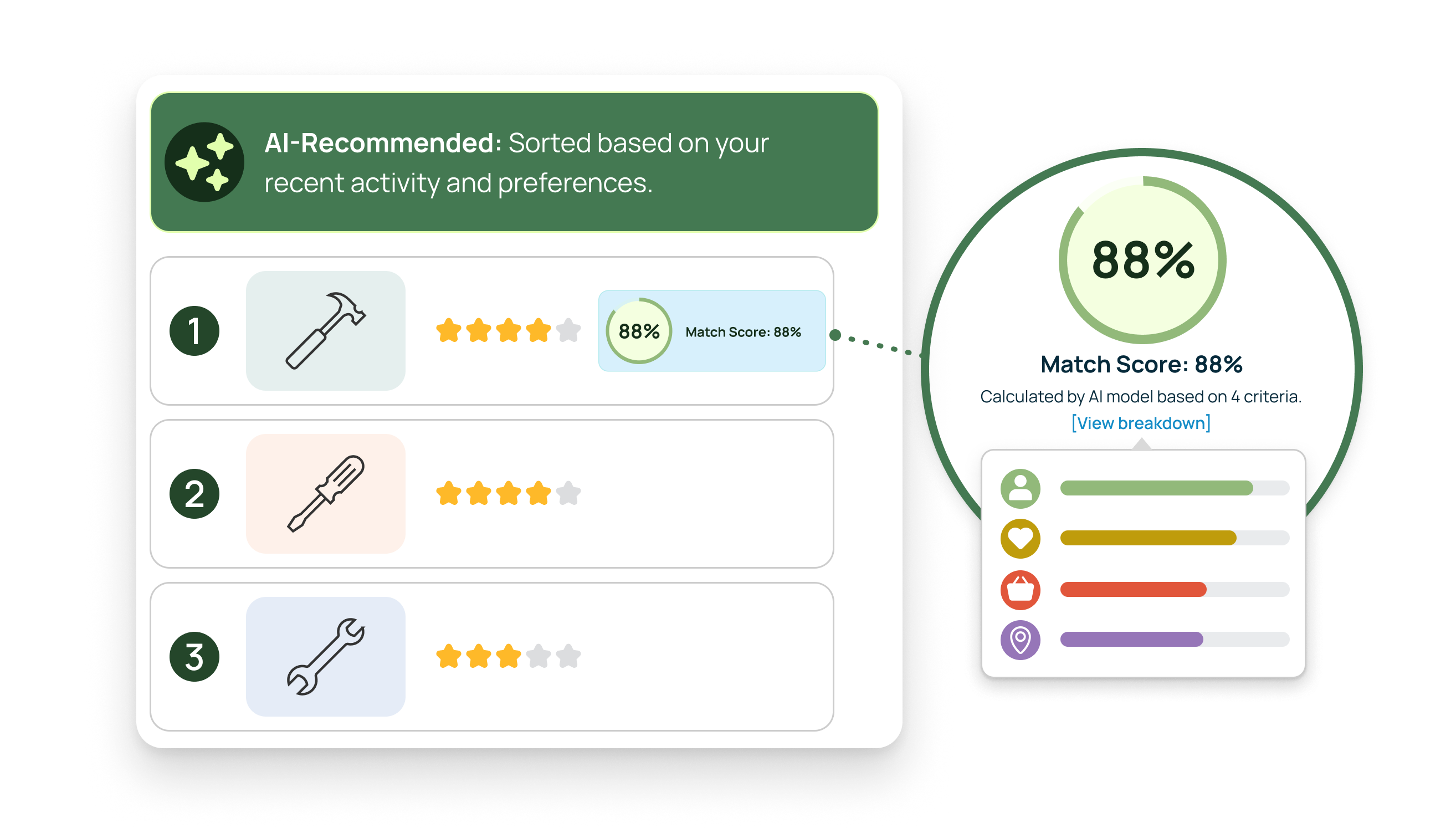
Above a personalized list: AI-recommended - Ranked using your recent activity and preferences
Beside a predictive score:
Match score: 88%
Calculated by AI using 4 factors. View breakdown
For a risk assessment:
Risk level: Medium
Calculated by AI using 4 factors. View breakdown
Image example
AI-recommended ranked list with match scores and a factor breakdown callout showing 88% calculated by AI model based on 4 criteria.
Usage guidance
  • Clearly distinguish match scores from risk scores.
  • Explain whether a higher score represents a better or worse outcome.
  • Make View breakdown a link or button; do not display square brackets in the interface.
  • Identify the most important factors behind the result.
  • Explain which user data or activity influenced a personalized recommendation.
  • Where appropriate, let users correct relevant information, request human review, or challenge the result.
  • Do not imply that a score is objective or guaranteed to be accurate.

4. AI-Generated Code and Suggestions

Classification:Recommended engineering practice
Guideline

Visually distinguish AI-generated code and unaccepted suggestions from developer-authored code. Keep the source visible until the suggestion is accepted, and prompt developers to review and test generated code before running or merging it.

Ux copy examples
Language-neutral label above a code block: AI-generated code — review and test before running.
As a code comment:
JavaScript
/* AI-generated — review and test before running. */
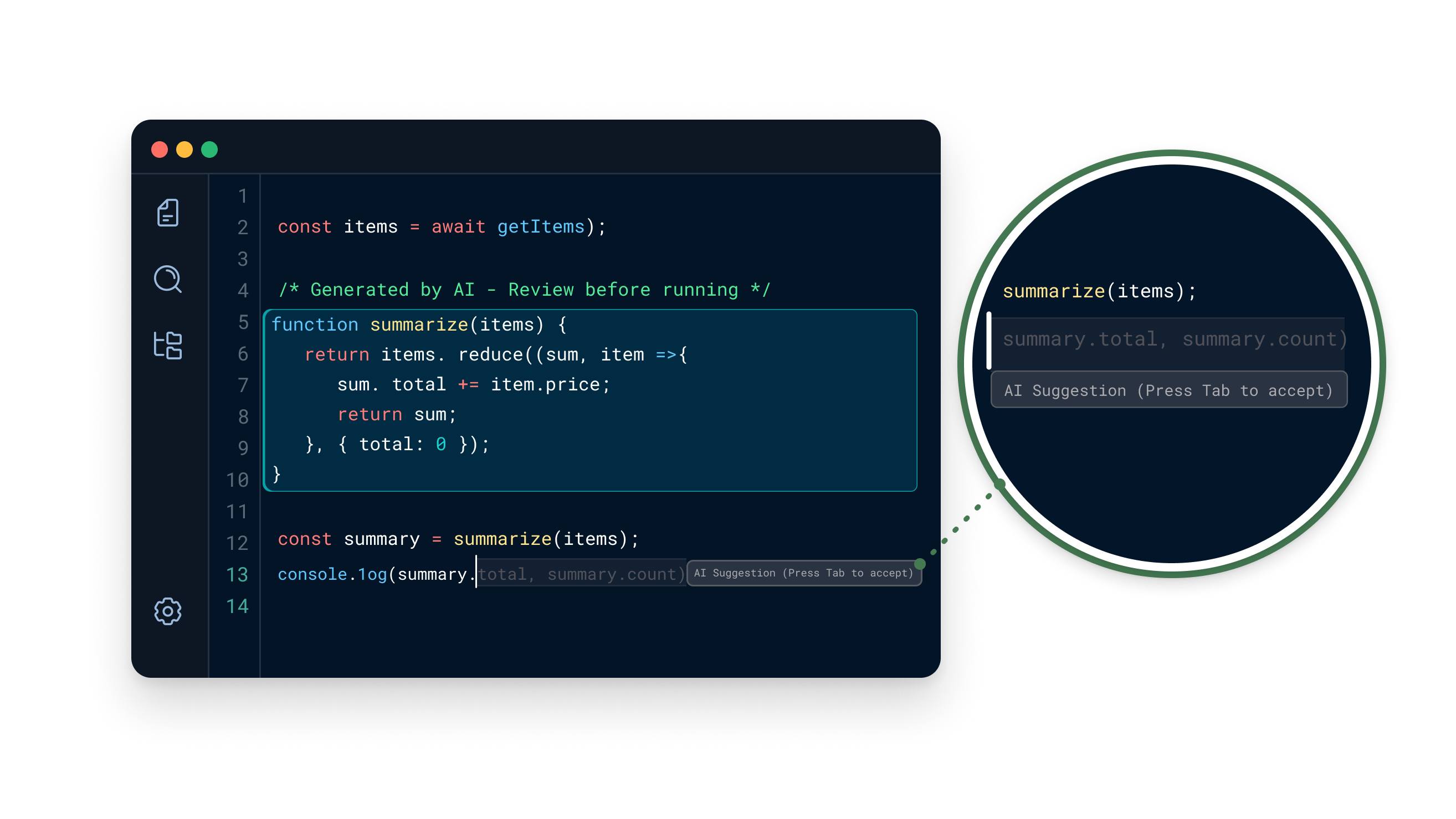
For inline autocomplete: AI suggestion - Tab to accept
Image example
Code editor with AI-generated code highlighted and an inline autocomplete suggestion tooltip reading 'AI Suggestion (Press Tab to accept)'.
Usage guidance
  • Use a label, border, container, or icon in addition to color.
  • Keep unaccepted code visually distinct but readable.
  • Adapt 'Tab to accept' to the user's platform and input method.
  • Preserve AI provenance until the suggestion is accepted.
  • Consider retaining provenance in version history or metadata after acceptance.
  • Encourage developers to review, test, and scan generated code for security issues.
  • Do not imply that review guarantees the code is correct or secure.

Terminology

TermDefinition
Ai-generatedAI produced the output without meaningful human authorship or review.
Ai-assistedA human created or reviewed the output and remains responsible for it.
Ai-recommendedAI influenced the selection, order, or personalization of options.
Ai suggestionAI proposed content that the user has not yet accepted.
Automated decisionA system made or materially influenced a decision using automated processing.

Accessibility requirements

—Never communicate AI involvement through color alone.
—Pair icons with visible or programmatically available text.
—Ensure muted labels and ghost text still meet applicable contrast requirements.
—Make tooltip content available through both pointer hover and keyboard focus.
—Ensure tooltips can be dismissed and remain visible long enough to read.
—Expose badges, scores, and disclosure relationships to assistive technology.
← PreviousAI patternsNext →Design principles
Sprout · Aceve Design System · v3.19.1
Figma library GitLabReleases